
HyFlex Classroom
Enhancing Digital Teaching and Learning with the HyFlex Classroom
The HyFlex Classroom brings together hybrid and flexible learning in one seamless environment. It allows students to join classes in person or online, whether live or on their own time. This approach opens new opportunities for inclusive, adaptable, and engaging learning experiences within our faculty.
This quick guide is designed to help both academic and non-academic staff get familiar with the HyFlex space. Lecturers can explore its features to make lessons more interactive and accessible, while support staff can also make use of the room for training sessions or workshops.
Get to Know the HyFlex Classroom at UTMSPACE Johor Bahru
Teaching Point:
This is where all the essential tools for conducting a class come together. Below are the key features available for teaching.
- Smartboard with Hybrid Whiteboards:
The classroom is equipped with an 86-inch smartboard that supports teaching, writing, and Webex sessions for online participation. It comes with built-in interactive software that allows lecturers to write, draw, and annotate directly on the screen. Two side whiteboards are also available for marker use, and any writing on these boards can be displayed on the smartboard for online learners to view in real time. - Connectivity:
With the Wireless Media Connect Plus (WMC+) system, lecturers can wirelessly connect their devices to the smartboard via Wi-Fi, making lessons more efficient and interactive. - Online Session:
For hybrid sessions, lecturers can use Webex to share their screen. The smartboard’s interactive software enhances online learning by providing tools for writing, annotation, and visual explanation during live sessions. Through the Webex control interface, lecturers can also switch between cameras and manage the class easily. - In-Class Cameras:
Two cameras are installed at the front and back of the classroom. One focuses on the lecturer while the other captures the students. Both can be managed using a remote control or directly through Webex. - Audio:
Six clip-on microphones are provided, with two for lecturers and four for students. This setup ensures clear communication for face-to-face, online, and hybrid teaching.
Learning Point:
This is where students experience a fully equipped learning environment designed for flexibility and engagement.
- Visuals:
Students can view lessons on the main 86-inch smartboard, supported by two additional 65-inch displays positioned for better visibility. - Screen Sharing and Connectivity:
With the WMC+ system and Wi-Fi connection, students can share their screens wirelessly to the smartboard and interact directly with the displayed content. - Audio:
During learning sessions or presentations, students can use the provided microphones to participate or present clearly. - Seating Arrangement:
The classroom features modular seating that can be rearranged to suit different learning or training activities. The space can comfortably accommodate up to 40 students at a time. - Power Access:
The seating area includes six floor-mounted power units providing up to 18 power points. Students are also encouraged to bring additional extension plugs if needed for convenience.
Explore the Learning Point facilities through the 360° Virtual Tour below:
Explore the Teaching Point facilities through the 360° Virtual Tour below:
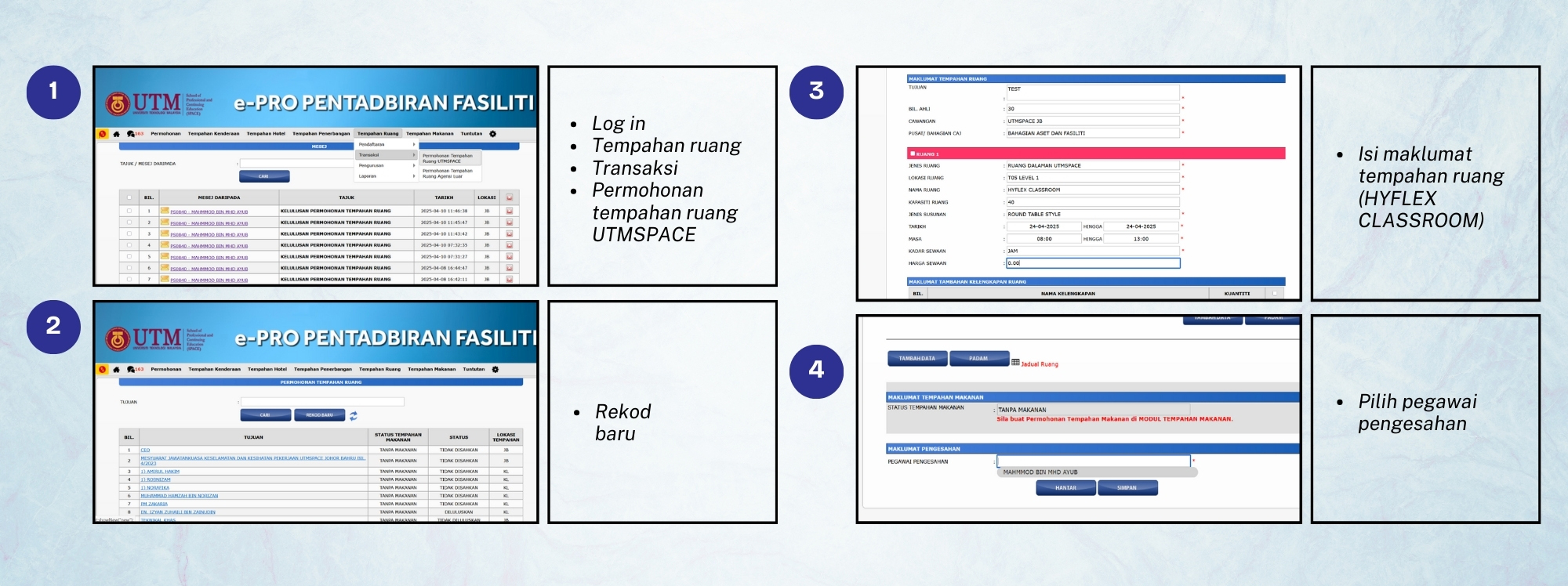
Booking Procedure
Each division has staff assigned to handle bookings. The following outlines the steps on how to make a booking:
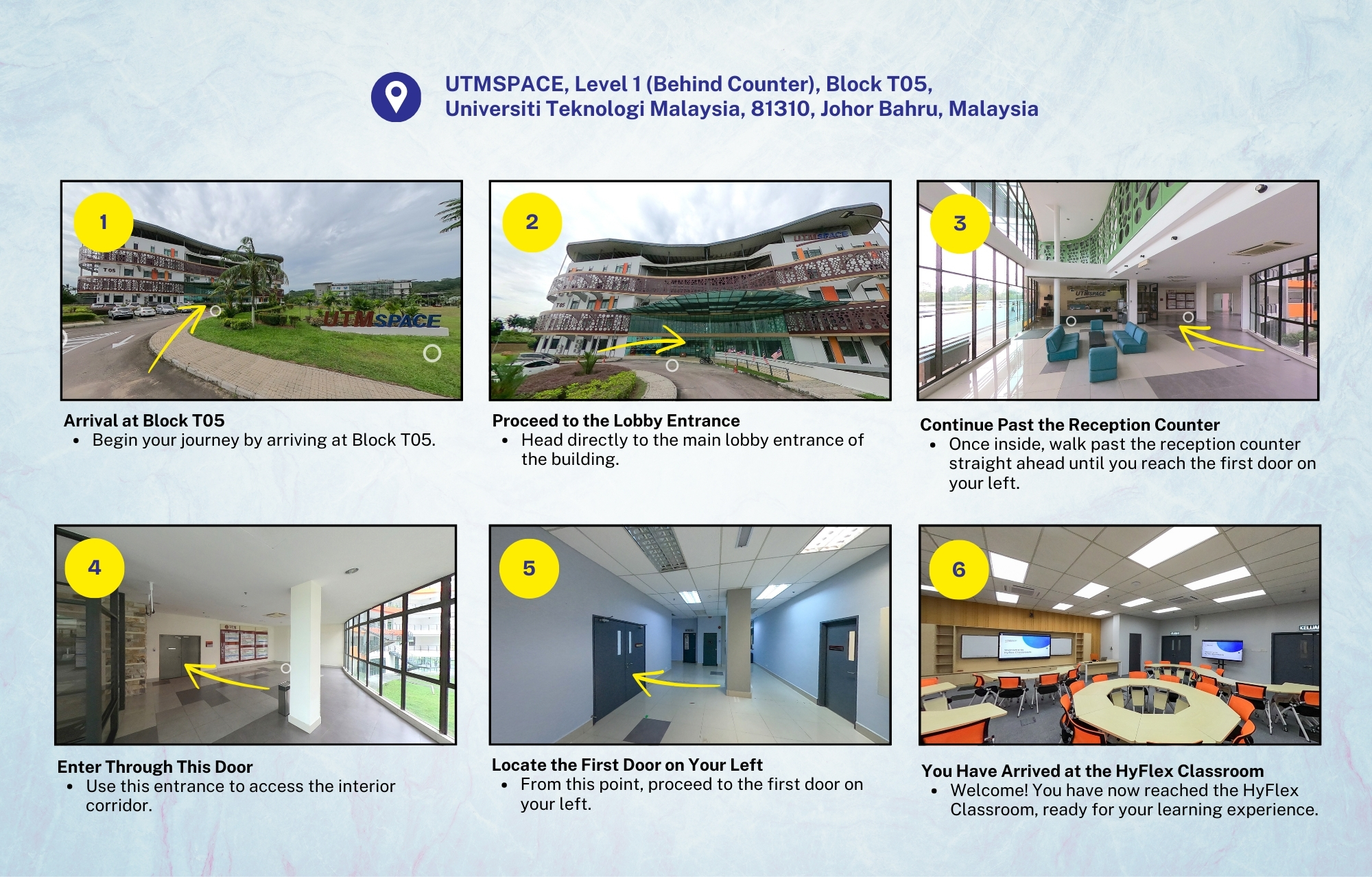
Get Into the UTMSPACE JB HyFlex Classroom
The HyFlex Classroom is located on Level 1, Block T05, UTMSPACE Johor Bahru, just behind the main counter. Step inside and explore the space through the full 360° Virtual Tour available at the link below.
Learn More About the SwipeBoard System & HyFlex Classroom
You can download the Info Kit and Guidelines to learn more about using the SwipeBoard system effectively through the link below: